Using Python with seismic data
Lesson 6: obspy and datetime
Obspy is a full and feature-rich package containing
software for processing and plotting seismic data.
Install obspy in Thonny, then use the UTCDateTime
class to manipulate date-time data in preparation for handling seismic traces
in Lesson 7.
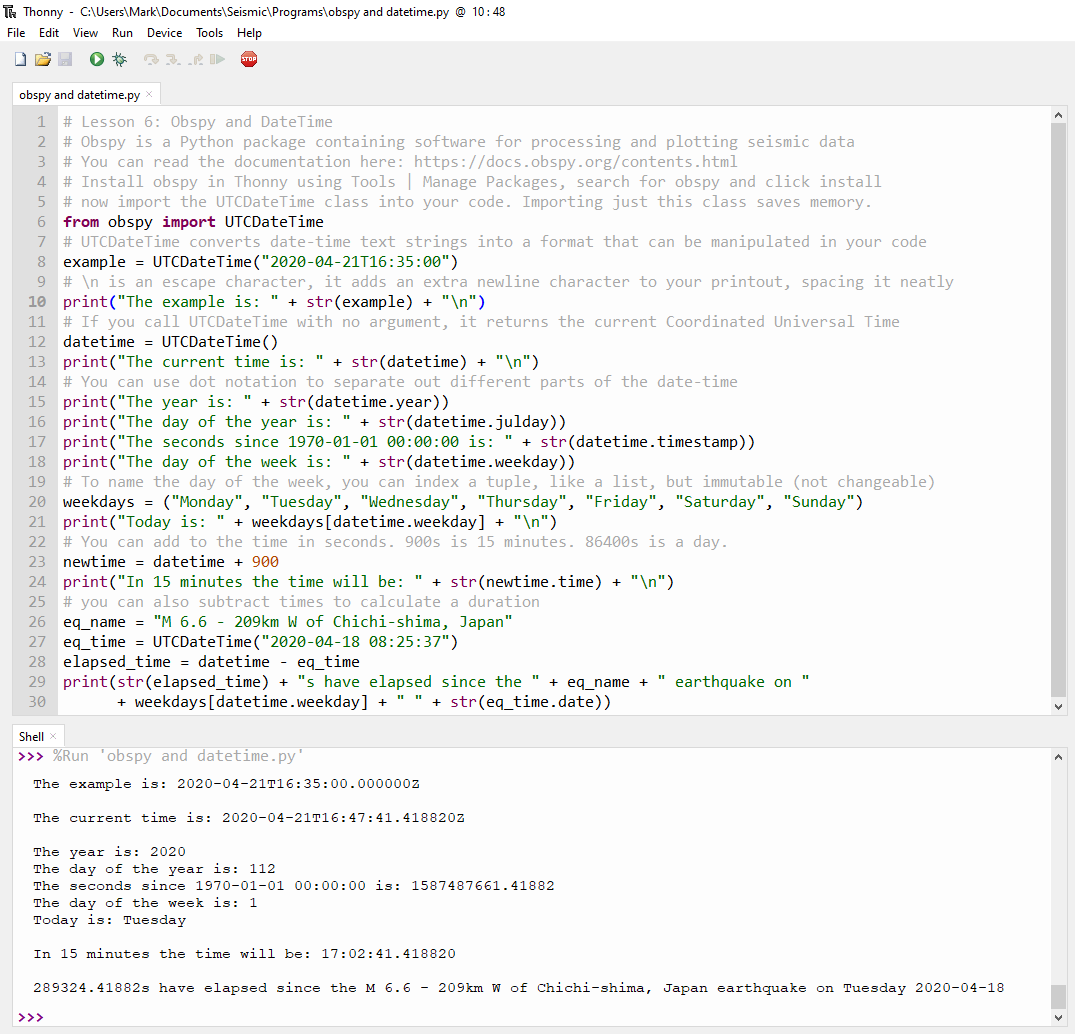
Importing software
"from obspy import UTCDateTime"
imports just this class into your script, saving memory. UTCDateTime
converts datetime text strings into a format that can be manipulated in your
code.
Dot notation
Access parts of the date object using dot notation, perform basic maths using
addition and subtraction.
Escape characters
This code introduces \n in some print statements. \n is an escape character,
which prints an extra new line, adding white space to the output.
Tuples
Also in line 20, there is a tuple, named weekdays. A tuple is a collection of
data that can't be changed, but otherwise behaves like a list.
UNIX time
The POSIX time or Unix time is the number of seconds that have elapsed since
midnight UTC on January 1, 1970.
When performing calculations with datetime in obspy,
add or subtract seconds. Time differences will be reported in seconds.
Obspy Tutorial
The obspy tutorial for UTCDateTime() is here: https://docs.obspy.org/tutorial/code_snippets/utc_date_time.html
In the obspy tutorial, code is typed directly into
the Shell. In Thonny, this is the window at the
bottom of the screen containing the >>> prompt.
Now you can try the exercises at the bottom of the obspy
tutorial.
Links
The original tweet:
https://twitter.com/wmvanstone/status/1252642206680322055
The code on Github: https://github.com/wmvanstone/LearnPythonForObspy
The obspy tutorial: https://docs.obspy.org/tutorial/
Lesson 7: python07.htm
Lesson 5: python05.htm
Links: Links
Home: Index